


Intersoft WebSpellChecker is the first spell checker component in the industry to provide two modes of spell checking user interface.
- Red-wave Underline Highlight
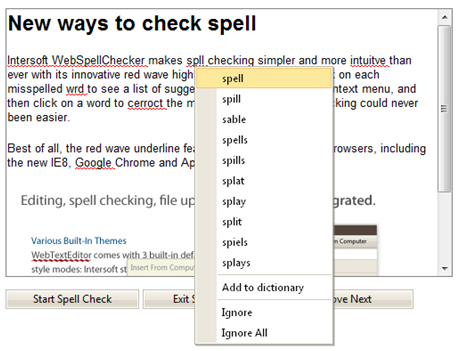
WebSpellChecker introduces more natural, intuitive way to perform spell checking with red wave highlight feature. To correct misspelled words, just right click on each word and choose the correct word from the displayed context menu. It makes spell checking faster and easier than ever.
The red wave highlight feature can only be enabled on editable IFRAME.
- Sleek Dialog Box Interface
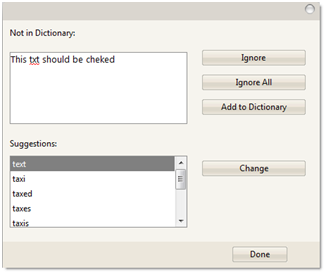
This mode will be automatically enabled when the target control is not an editable IFRAME. The dialog box interface includes visual elements that display checked words and the suggestion words list. Just double click on a word in suggestion list or click on the Change button to correct the misspelled word with the selected suggested word, and finally click on Done button to accept all changes and close the dialog box.
In This Section
How-to: Implement spell checker with red wave highlight
How-to: Implement spell checker with WebDialogBox